
Set hotkeys to perform common tasks
One of the best ways to speed up your productivity is to take your hand off the mouse and start using your keyboard a lot more.
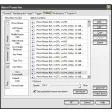
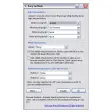
However, this is easier said than done. First because we're all so used to doing everything by mouse that using anything else just feels weird and clumsy but most importantly, Windows doesn't come with any kind of hotkey configuration utility to help you get more out of your keyboard. That's where Hotkeycontrol XP comes in because it provides an ultra easy and convenient way to configure hotkeys for just about any task - well almost any task. The excellent thing about this program is that it can make use of all those multimedia keys that you never use anymore - the ones that launch the internet, your media player, file browser etc. Rather than have them redundant, Hotkeycontrol XP maps your keyboard and them allows you to assign actions to each one. This suddenly enables you to use your keyboard for everything from running programs and opening files to moving folders and saving webpages. One of the most useful functions of this program however is that it can save you hours of time in wasted typing - if you regularly type the same sorts of e-mail responses, you can use the program to automatically enter a block of text based on the simple press of a hotkey.
A superb utility that speeds-up your working day, makes hotkey configuration a breeze and makes better use of your keyboard.
Better performance, lower response time while detecting hotkeysQuick edit option to change hotkeys fasterFamiliar Office 2007 look and feelText macros now support all keys rather than just alpha-numeric keysAbility to printout list of configured hotkeysMinor bug fixesDesigned for Windows Vista (one of the few hotkey programs designed for Vista)OSD is displayed when volume is changed by an external program (only in Vista)
Changes
Better performance, lower response time while detecting hotkeysQuick edit option to change hotkeys fasterFamiliar Office 2007 look and feelText macros now support all keys rather than just alpha-numeric keysAbility to printout list of configured hotkeysMinor bug fixesDesigned for Windows Vista (one of the few hotkey programs designed for Vista)OSD is displayed when volume is changed by an external program (only in Vista)










.png)


















User reviews about Hotkeycontrol XP
Have you tried Hotkeycontrol XP? Be the first to leave your opinion!